Discount Wizard
Dutchie — B2B SaaS — Web
Project Overview
Dutchie is a leading technology platform powering cannabis dispensaries. Within the B2B platform, cannabis operators rely heavily on promotional tools to manage complex pricing rules, state-regulated discounts, and loyalty incentives.
As the sole product designer leading this initiative, I partnered with a Product Manager and an engineering team over a multi-month timeline to completely overhaul Dutchie’s discount creation tool.
The Problem: High Cognitive Load & Costly Checkout Friction
The legacy discount builder relied on a dense, tab-heavy interface. Instead of guiding users through a logical sequence, it forced operators to jump between disconnected tabs to configure discounts.

This fragmented UX led to a severe lack of clarity, triggering an ongoing influx of customer support tickets centered around three critical frustrations:
"Why isn’t this product being discounted?"
"Why isn’t this discount applying the way I intended?"
"Why is this item being discounted by mistake?"
The Stakes: In a fast-paced retail environment like a dispensary, these UI ambiguities had real-world consequences. Unintended discount combinations cost operators significant revenue, while failed discounts at the point of sale caused friction for budtenders and frustrated end-consumers waiting in line.
The Goal
Transform a confusing, fragmented configuration tool into an intuitive, error-proof experience that minimizes support tickets, reduces checkout friction, and gives operators total confidence in their promotional pricing.
Research & Cross-Functional Alignment
Unpacking the Legacy UX Flaws
Without a logical flow, the legacy interface forced users to guess their way through discount creation. Through retrospective analysis and customer support feedback, we identified several critical design flaws:
Fragmented Settings: Interdependent configurations were arbitrarily split across tabs. For example, a user had to select the start date on one tab, but the day of the week on an entirely different tab.
Lack of Hierarchy: Inputs were unorganized and lacked visual nesting, forcing users to scroll through dense fields without understanding how one setting affected another.
Poor Guidance & Hidden Errors: Tooltips were present but often vague, leading to errors that were not caught until the discount had already started running. This created complications during checkout for the budtender and end consumer.
Competitive Analysis & Team Alignment
To pivot from a reactive fix to a proactive system improvement, I initiated a competitive analysis. I audited several industry competitors—including Treez, Jane, Sweede, and Blaze—mapping out their UX frameworks for promotional workflows.
By breaking down how competitors handled discount methods, targeting conditions, and scheduling, I validated a clear pattern: the most successful systems used a structured, step-by-step approach to group dependent rules logically.
Driving Alignment: Because I was carrying this product independently, cross-functional communication was critical. I established weekly design syncs with my PM, Engineering team, and Design leadership to share these competitive insights and review progress. Outside of these syncs, I ran ad-hoc 1:1s with my PM to quickly resolve ambiguities and keep requirements aligned with technical capabilities.
Design, System Strategy & Constraints
Instead of forcing users to navigate fragmented tabs, I re-architected the entire workflow into a strict 6-step wizard. This established a logical order of operations and prevented users from missing critical dependencies:
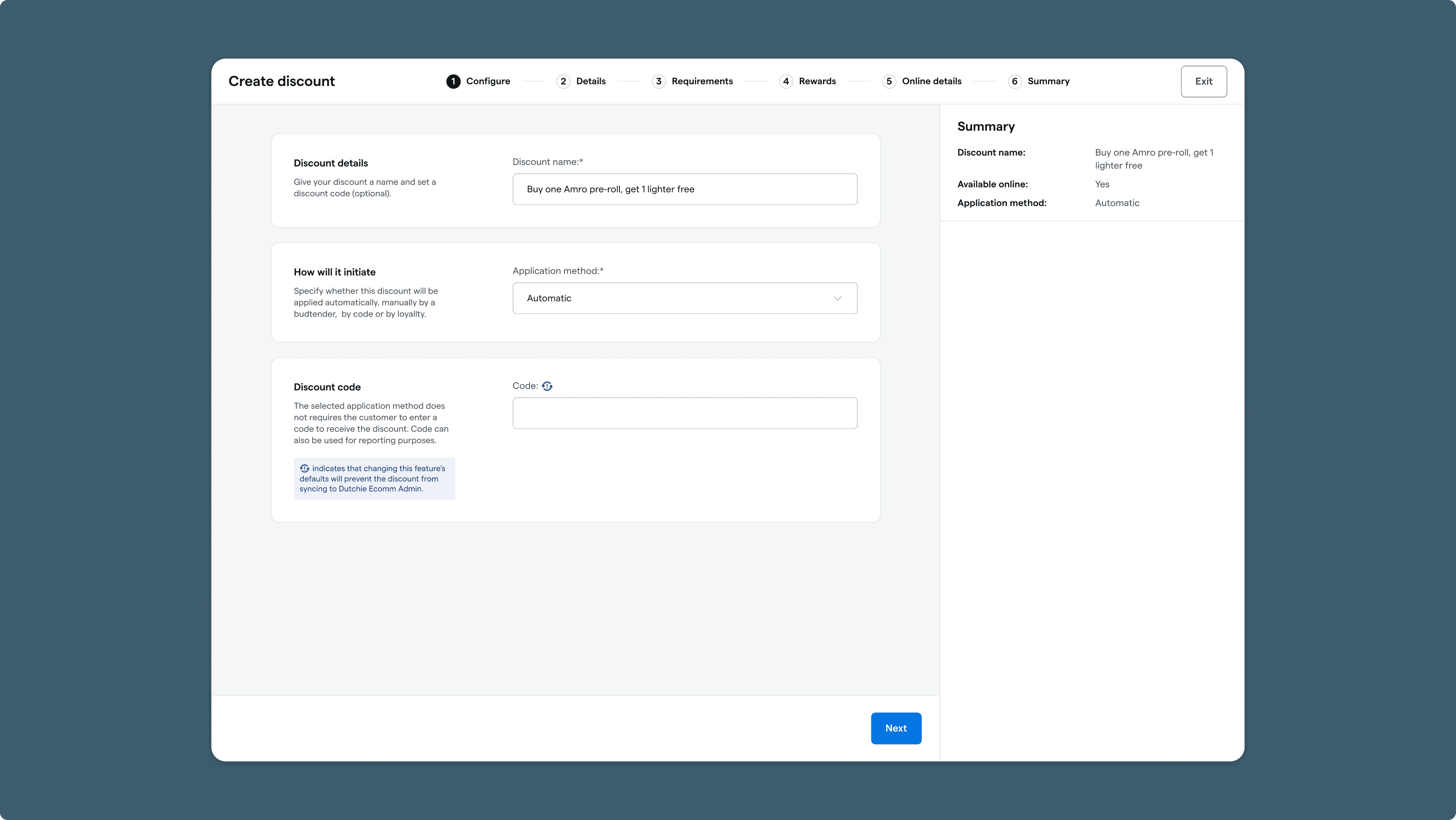
1. Configure
The Purpose: Tell the system what the discount is and how a customer triggers it.
What’s on Screen: The user sets the name and chooses the application method—whether it applies automatically, requires a budtender to select it manually, or triggers via a promo code.
Sync Indicator: This step features our persistent info banner, which acts as an early warning system to flag potential syncing issues across our platfoms based on the choices made.
Discount code considerations: Right now, the promo code field stays visible because retailer teams use it to organize and tag discounts behind the scenes. For the MVP, we left this as-is, but my long-term design recommendation is to hide this field when a code isn't selected, and build a dedicated tool for handling that organization use case directly.
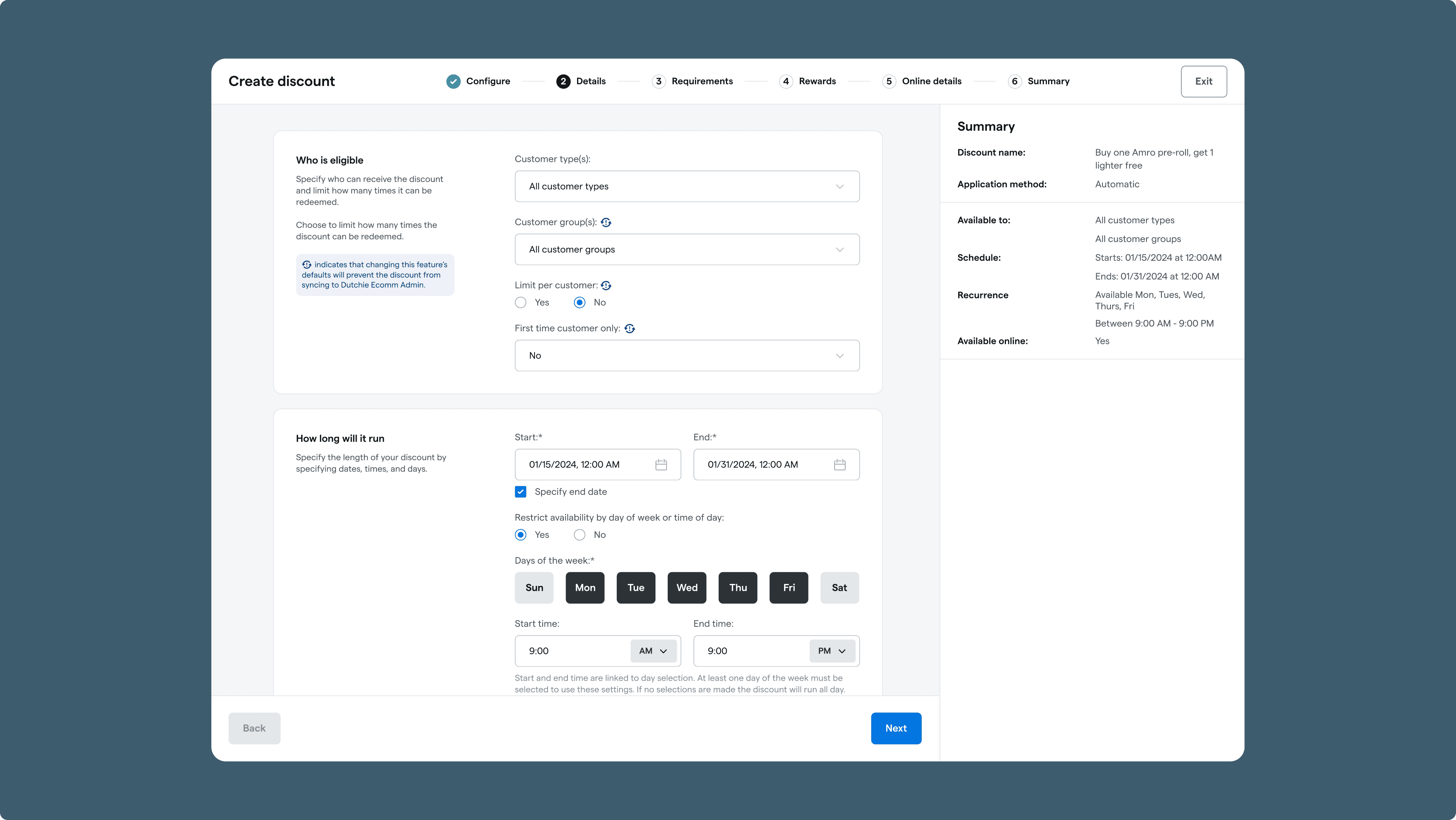
Details
The Purpose: Set the guardrails around who gets the discount, where it applies, and when it runs.
What’s on Screen: This step handles a massive number of variables. Users select eligible customer groups, set redemption limits, toggle stacking rules, choose specific dispensary locations, and configure tax overrides.
The "Never End Date" Toggle: To prevent operators from having to manually rebuild ongoing monthly promotions from scratch, I integrated a straightforward "Never End Date" option directly into the scheduler card, allowing discounts to run indefinitely.
Requirements
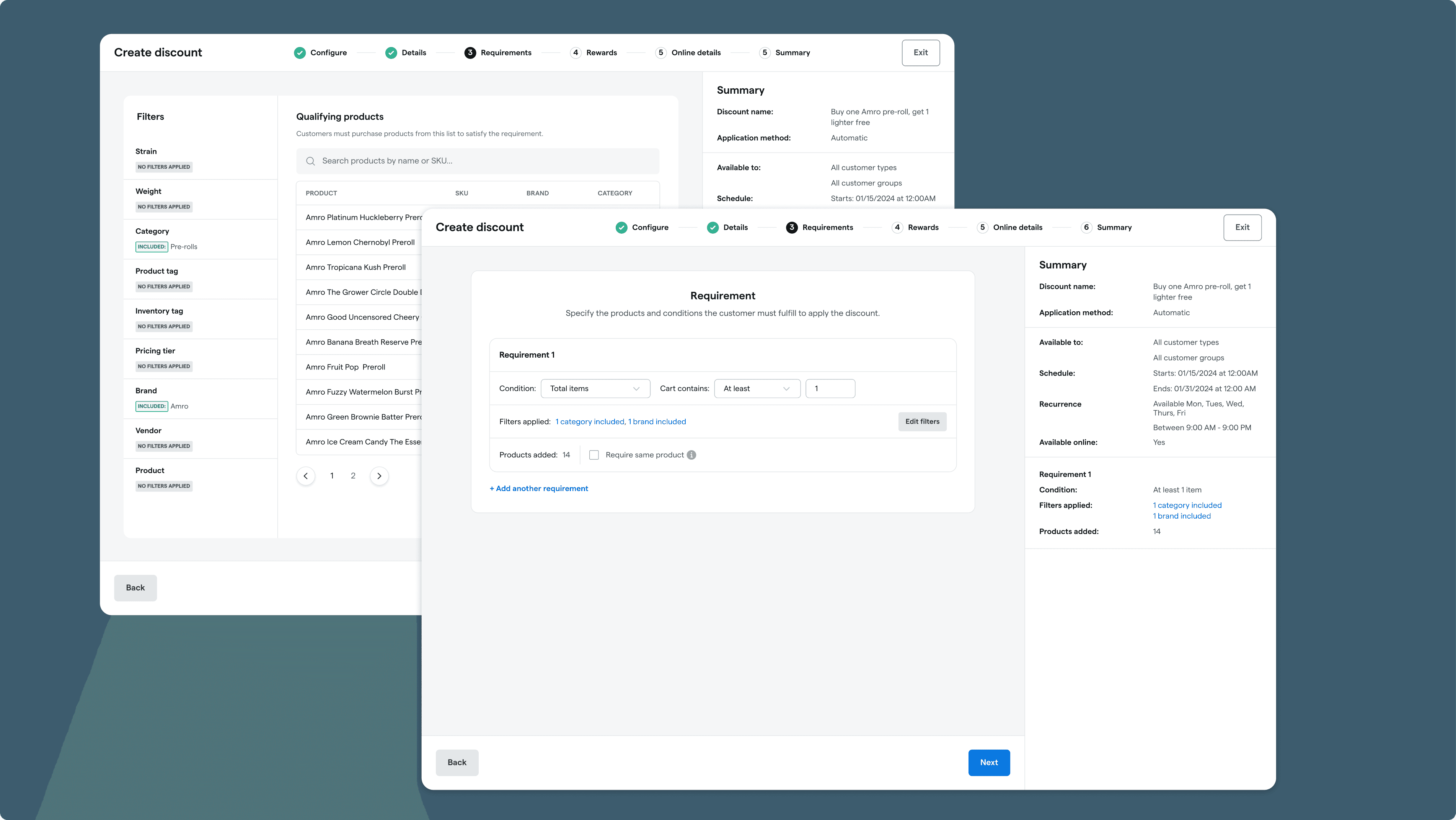
The Purpose: Define the exact purchasing conditions a customer must meet to unlock the reward.
What’s on Screen: Users can choose to require no conditions at all, or build out complex rules (like "Buy 1 Preroll").
Subtractive Filtering: The legacy tool relied on a subtractive filtering pattern, where users start with their full catalog and narrow it down. During design exploration, I tested an additive approach which allowed users to build their target list from scratch item by item. This was preferred by a majority of testers., but building that new logic from the ground up was too complex for our engineering timeline. We made the strategic choice to stick with the existing subtractive model for the MVP to ensure we hit our delivery dates.
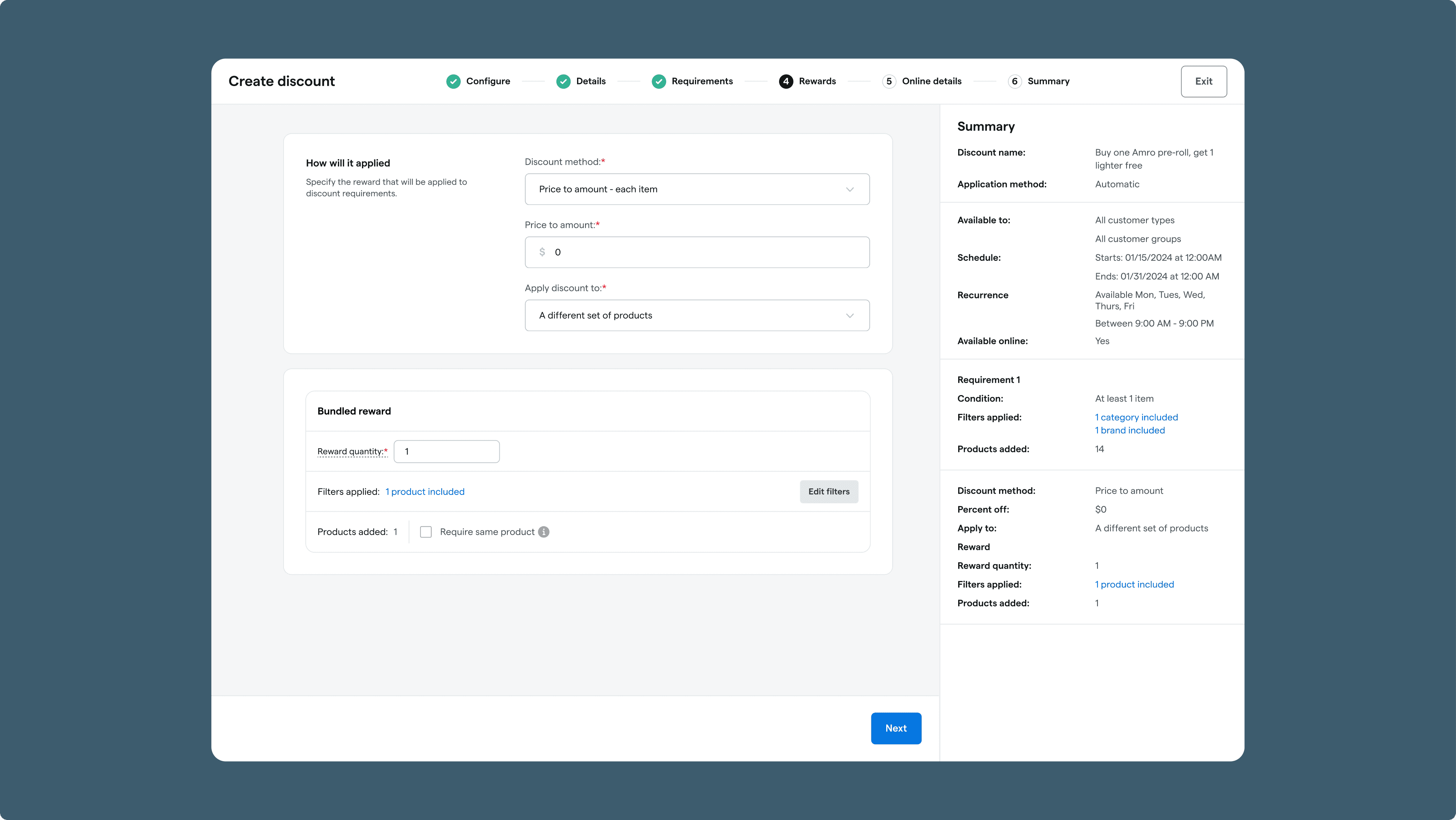
Rewards
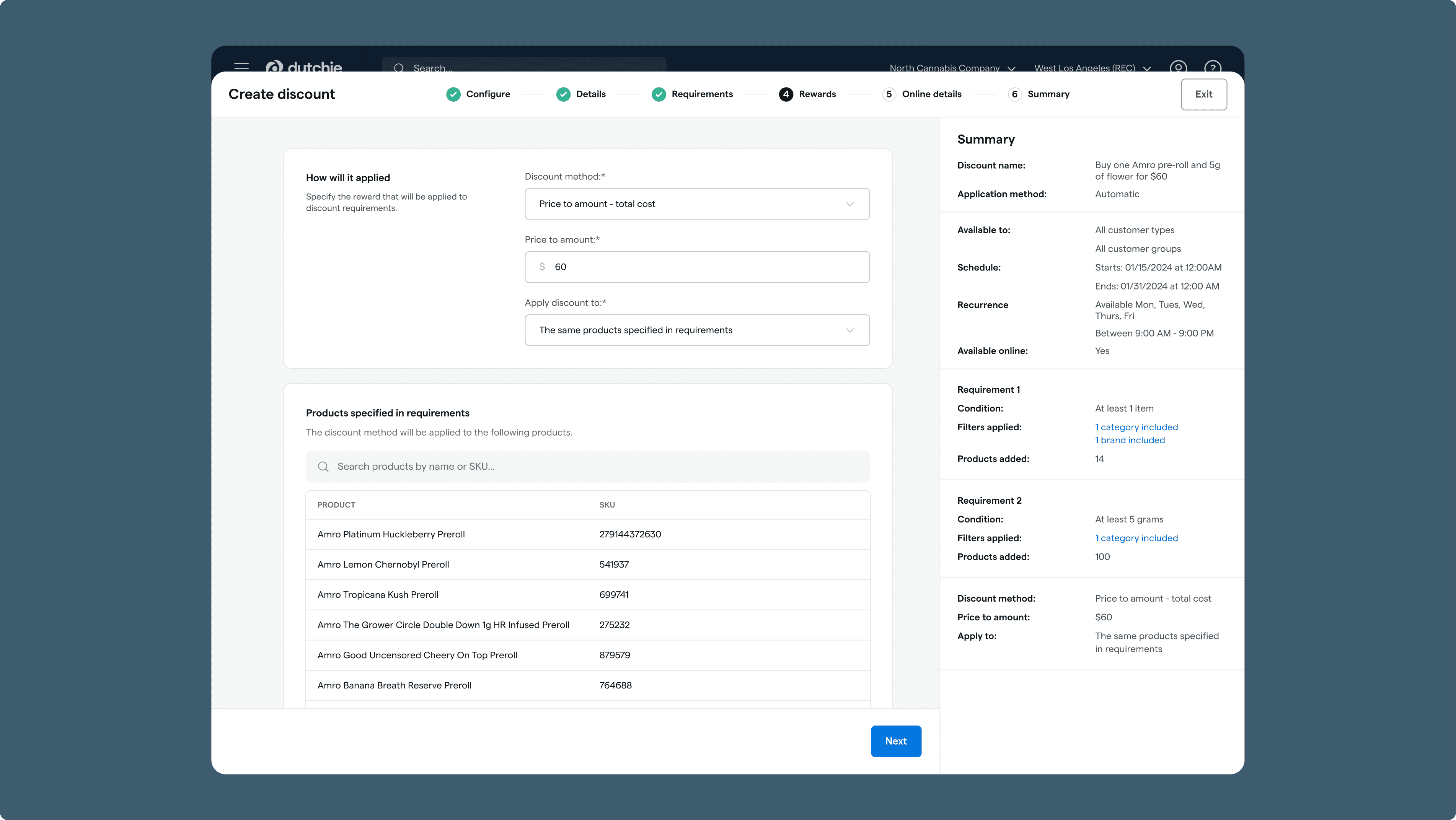
The Purpose: Calculate the discount math and choose what products it applies to.
What’s on Screen: The user determines the discount type (like a fixed percentage off or a set dollar amount) and defines whether that reward applies directly to the item that triggered the condition, or a completely separate set of products.
Online Details
The Purpose: Customize how the promotion looks to the end consumer browsing online.
What’s on Screen: Since Dutchie powers both the backend operations and the consumer-facing e-commerce menus, this step lets operators customize the exact titles, descriptions, and visual badges that retail shoppers see on their webpages.

Summary & Validation
The Purpose: Review every decision in one place and resolve final validation errors before publishing.
The Rolling Summary Review: This final screen acts as a complete snapshot of all five previous steps. Instead of forcing users to click all the way back through the wizard to fix a typo, every summary block includes a direct shortcut link to jump straight to that specific step for quick edits.
The Final Sync Warning: If any field combination creates a sync conflict, the system highlights the exact problem field on this page, giving the user a clear explanation of the issue and a direct way to fix it before if they choose to do so.

Scaling the Design System
To maintain platform cohesion and speed up implementation, I didn't build everything from scratch. I reused an existing drawer component from our Register product as the foundational container.
However, the stepper, card styling, and summary sidebar were completely custom patterns I designed. I fully documented them in our design system—complete with specific sizing rules and stepper states. This wizard format proved highly scalable and has since been adopted by other designers across the team for tools like our Campaign Builder and Loyalty and Marketing flows.
Impact, Realities & Key Takeaways
Results & User Sentiment
The redesigned Discount Wizard was successfully launched into an Alpha testing phase. Initial sentiment among operators was positive regarding clarity and error reduction.
However, testing also surfaced a common B2B UX challenge: change aversion. Power users who had spent years mastering the quirks and workarounds of the old, flawed layout noted that the wizard format felt slower to navigate. They had already absorbed the "tax" of the bad UX through muscle memory, and forcing them into a deliberate, step-by-step flow disrupted their speed.
Key Takeaways
Designing Within the System's Current State: This project proved that great UX isn't always about a perfect backend refactor. Whether it was masking backend date logic or adding alert cards for fragile sync architectures, I learned how to deploy guardrail solutions to protect users when engineering cannot immediately overhaul the system.
The B2B Speed vs. User Safety: In consumer apps, keeping users safe is a priority; in complex B2B platforms, efficiency is money. If I were to iterate on this further for the general availability launch, I would leverage Dutchie's new AI tools to create an "express mode" for power users that could bypass most of the steps with a simple prompt. This would allow those users to continue to move fast while maintaining the wizard as the default safety net for the broader user base.